 Thai Baht Converter
เครื่องมือวัดอุตสาหกรรม l Measuring Instruments [10184]
คุณสมบัติการใช้งานเครื่องมือวัด l Featured Products [870]

| รหัสสินค้า | SKU-23853 |
| หมวดหมู่ | PSW Series,Programmable Switching D.C. Power Supply,Texio |
| ราคาปกติ | |
| ลดเหลือ | 0.00 บาท |
| สถานะสินค้า | Pre-Order |
| ลงสินค้า | 4 พ.ย. 2568 |
| อัพเดทล่าสุด | 4 พ.ย. 2568 |
| คงเหลือ | 1 ชิ้น |
| จำนวน | ชิ้น |


 |

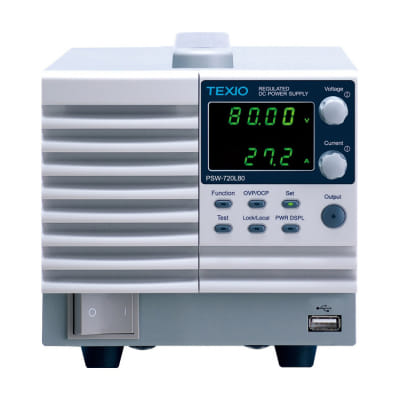
Flexible and efficient voltage/current output within the rated power
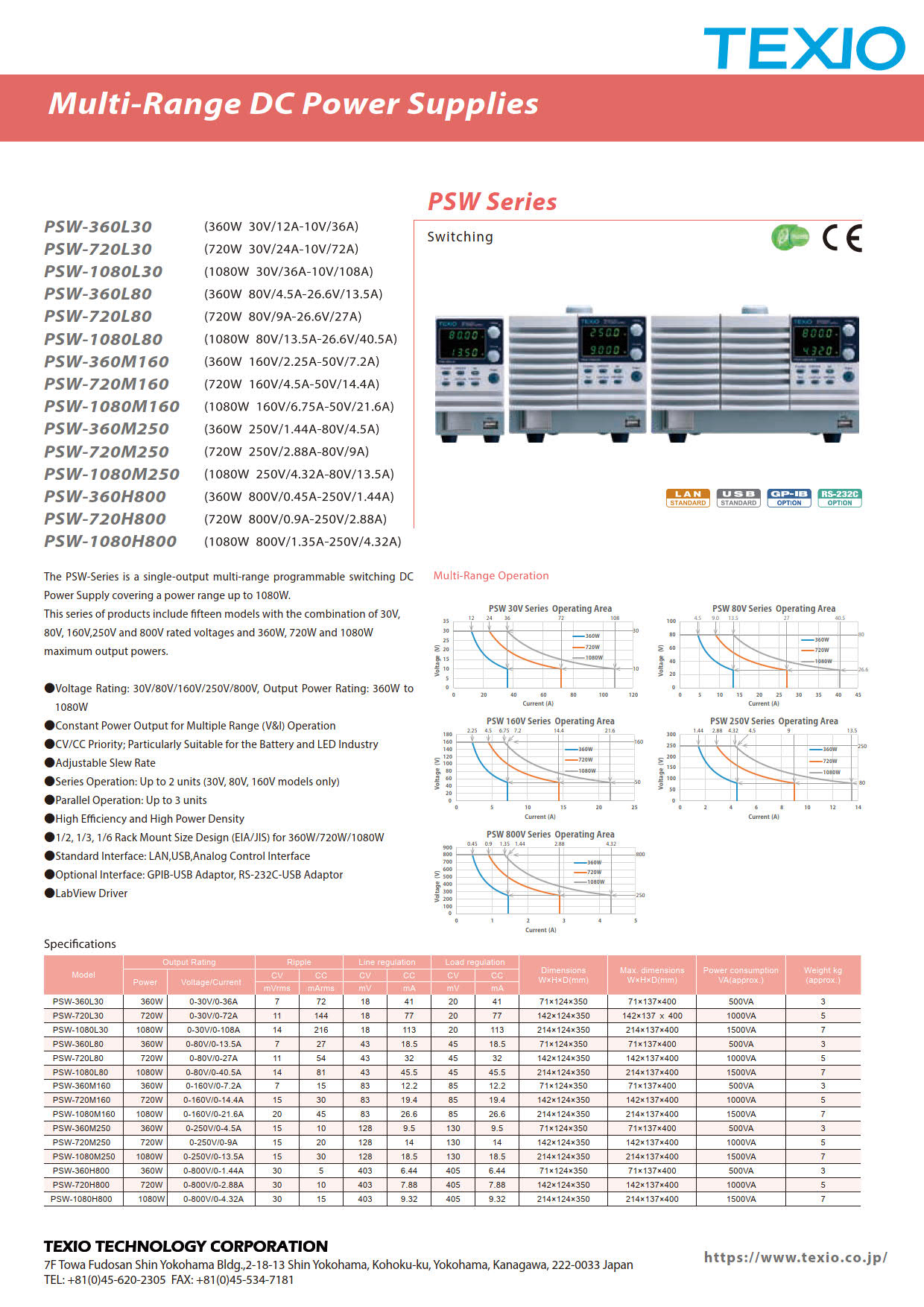
The PSW-A Series is a switching-type DC regulated power supply capable of a wide range of voltage and current output within the maximum rated power.
Three output capacity types (360W, 720W, and 1080W) and five maximum voltage types (30V, 80V, 160V, 250V, and 800V) are available, covering a wide range of applications. USB and LAN ports are standard, and rack-mounting is also possible, allowing for use as a system power supply. The
PSW-A Series retains the functionality of the previous PSW Series, while also including optional features (logging, constant power control, tUVP, fan stop, and fixed setting digits) as standard.
*The PSW-A Series does not have a power switch trip function.
The test function automatically updates voltage and current settings over time for up to 2000 steps.
No programming is required; simply edit CSV files and load them into the unit via USB memory.
Up to 10 CSV files can be saved to the unit, eliminating the need for a USB memory stick.
Test mode setting application: PSW_TestMode_Writing.
Even in environments where security restrictions prohibit the use of standard USB memory sticks, you can set steps via communication (USB/LAN) and use test mode. In addition to transferring steps, this app also allows editing test mode data, displaying simple graphs of setting data, and simple remote control.
For environments where USB memory sticks cannot be used, a Windows application is available for transferring CSV files to a PC via USB or LAN. It
is available from the manufacturer's website (https://www.texio.co.jp/product/detail/197#section1). Test mode requires firmware version 1.57 or later.
The PSW-A series allows you to set the voltage (VSET), current (ISET), and power (PSET). Depending on the three settings and the load (R) connected to the power module's output, each power module operates in CV (constant voltage), CC (constant current), or CP (constant power) mode.
*Test mode requires firmware version 1.57 or later.
Explanation of CV, CC, and CP Mode Operating Ranges
[When PSET is the blue dotted line] If
the load (R) is "VSET/ISET < R," the module operates in CV mode (as indicated by the green line between A and B). If the load (R) is "VSET/ISET > R," the module operates in CC mode (as indicated by the red line between B and C). It does not operate in CP mode.
[When PSET is the blue line] The
module operates in CV mode (as indicated by the green line between A and D). When the output power reaches the PSET value, the module operates in CP mode (as indicated by the blue line between D and E). It operates in CC mode (as indicated by the red line between E and E).
*If the current or power setting is set to 10% or less of the product rating, operation in CP mode may become unstable.
Output voltage, output current, and status information can be continuously saved to the internal memory for a sampling time between 0.1 and 999.9 seconds. When using a USB memory stick, a CSV file is created and saved for every 1,000 data points. When
using a PC, data can be transferred via USB or LAN.
Log data output destination: Select either 1 or 2.
1. LAN/USB: IEEE-488.2 binary block format.
2. USB memory: CSV format (approximately 30 KB per 1,000 data points).
USB memory save: FAT32 format.
A folder named after the serial number is created, and
a file is created for every 1,000 data points.
Sampling time: 0.1 to 999.9 seconds (configurable).
Internal storage area: 8,000 data points
. All data will be cleared once 8,000 data points have been exceeded.
The tUVP function does not respond to gradual voltage drops, but shuts off the output when there is a sudden voltage drop. It
can be used in both constant voltage and constant current operation, and protects against sudden low impedance (short circuits, etc.) under all circumstances.
The forced cooling fan on the rear of the PSW-A can be set to stop for any time between 1 and 120 seconds. After that, the fan will automatically start again and continue rotating for the same amount of time it was stopped to cool the inside of the unit.
It is possible to output a wide range of voltages and currents within the rated power range.
For example, the PSW-360L30 can be used as both a 30V/12A CV/CC power supply and a 10V/36A CV/CC power supply.
The slew rate of the output voltage/current can be turned on/off,
preventing damage to the load caused by sudden changes in voltage/current.
This compensates for the voltage drop in the wiring from the output terminal to the load.
The compensation voltage is a maximum of 0.6V per side for the 30V/80V/160V models, and a maximum of 1V per side for the 250V/800V models.
It is possible to set any internal resistance. Since it outputs a voltage that is the set voltage minus the voltage drop due to the load current, it can be used as a pseudo battery with internal resistance.
The panel lock function prevents accidental panel operation errors. When the panel lock is enabled, the "Lock/Local" key lights up and all keys other than the "Lock/Local" key and the voltage and current knobs are disabled. The "Output" key can only be used for off operation.
It outputs a monitor voltage of 0V to approximately 10V for output voltage and output current of 0 to the output rating.
The protection functions respond to overvoltage, overcurrent, overheating, AC input failure, and alarm input, and will turn the output ON or turn the power switch OFF.
(Note: An alarm will sound when the power switch is turned OFF, but this is not a malfunction. The alarm can also be turned OFF in the settings.)
The PSW series has a capacitor connected to the output terminal, and is equipped with a bleeder circuit to discharge the charge when the output is turned off. Turning the bleeder circuit off can prevent discharge from connected batteries, capacitors, or other batteries when the output is turned off.
Master-slave operation is possible with three units of the same model connected in parallel, and two units of the same model connected in series (excluding 250V/800V models).When in master-slave operation, the total output is displayed only on the master unit.
Equipped with a power factor correction circuit, the power factor at rated output is 0.99. The input power is compatible with AC100V to 240V worldwide.
Voltage and current control using external voltage, voltage and current control using external resistance (10 kΩ), output ON/OFF via external contact, shutdown, output voltage monitor, status output signal (CV/CC, ALM, OUTPUT ON, POWER OFF)
For external digital control, LAN and USB are standard, and GP-IB and RS-232C are also supported by using optional adapters.
For connection examples, please refer to (https://www.texio.co.jp/wp-content/uploads/2023/03/22_PSW_Connection.pdf).
・LAN allows access via socket communication and a web browser.
・USB communicates via a virtual COM port in the USB-CDC class.
・GP-IB communication is via the GP-IB adapter GUG-001.
・RS-232C communication is via the RS-232C adapter GUR-001B.
The YS option adds the SAS function, which simulates the output characteristics of a solar cell array, and the functionality of the Y1 option to the PSW. The output characteristics of a solar cell array can be configured simply by setting the following two parameters:
open circuit voltage
, short circuit current
, maximum power voltage
, and maximum power current . The expanded test mode and communication-based configuration from a PC also allow you to simulate time-varying output characteristic changes and acquire logging data.
This option reduces earth leakage current by removing the noise filter connected between the AC line and FG.
Even when used with an AC power supply equipped with a ground fault circuit interrupter that operates at low leakage current, the circuit breaker is less likely to malfunction. This
is particularly effective when combining a large number of PSW power supplies in a system. However, since the noise voltage from the PSW power supply to the AC line increases, this option is not CE compliant.
This is a factory option that adds high-resolution logging and current/power integration functions.


|
Model |
PSW-360L80A |
|
Rated Power |
360W |
|
Output (voltage/current) |
0-80V/0-13.5A |
|
Ripple CV |
7 mVrms |
|
Ripple CC |
27 mVrms |
|
Input fluctuation CV |
43 mV |
|
Input fluctuation CC |
18.5 mA |
|
Load fluctuation CV |
45 mV |
|
Load fluctuation CC |
18.5 mA |
|
Power consumption |
500VA |
|
External dimensions (width x depth x height) |
71×351×124mm |
|
Weight |
3kg |





















 Realtools Asia(ศูนย์รวมเครื่องมือวัดและชุดทดสอบอุตสาหกรรม)


